Lazada Open Platform
- Overview
-
Quick Start Guide
- Getting started
- Registration and Authorization process for newly registered ISVs
- Become a developer
- Register an application
- Retrieve App Key and App Secret
- Request API permission
- Start development
- Seller authorization introduction
- Configure seller authorization
- The Process of Creating Test Order
- Redmart api interface guide
-
API Best Practice
- OMS integrate with Lazada
- Product operation
- Order operation
- Seller Notification
- Financial inquiry
- Instant Messaging
- Lazada large package receiving "ISV_ERP" interface
- Sponsored Solutions
- Reverse order
- Lazada Marketplace Ease Mode API Reference - 中文
- Lazada Marketplace Ease Mode API Reference - EN
- Global Plus Product Upgrade
-
Push Mechanism(WebHook) Application
- Push API (Webhook)
- Webhook - CN
-
Webhook APIs
- Webhook API Trade Order Notifications
- Webhook API Product Quality Control Notification
- Webhook API Product Update Notificaton
- Webhook API Shallow Stock Notification
- Webhook API Short Video State Update Notification
- Webhook API Authorization Token Expiration Alert
- Webhook API Product Category Update Notification
- Webhook API Seller Status Update Notification
- Webhook API Fulfillment Order Update Notification
- Webhook API Reverse Order
- Webhook API Promotion
- Webhook API Product Review Notification
- Webhook API JIT PO Status Update Notification
- Webhook API IM Send Message Notifications
- Webhook API IM Session Update Notifications
- API Reference
- Advanced Tasks
- Developer's Guide
-
Security Center
- Security Measures
- Lazada Partner Application Security Guidelines
- Security Review Process
- Terms and Agreement
- FAQ
Set order status to RTS
This tutorial guides you to retrieve new order of your shop, and with its order details and the products information in the order through Lazada API. When the order is packed and ready to ship, you would need to change the order status to Ready to Ship (RTS). This API enables you to change order status programatically.
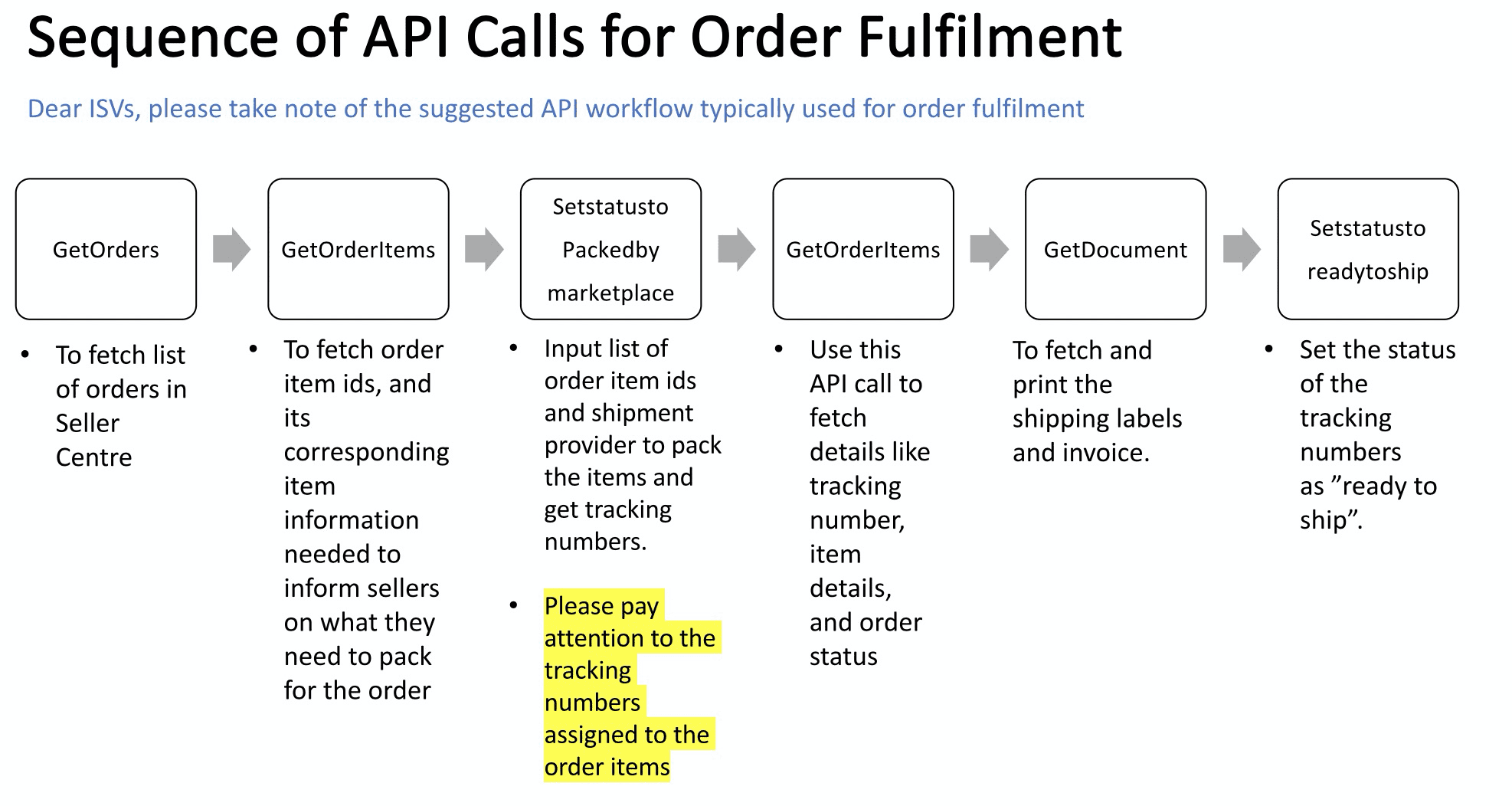
The flow of API calls:
- Get “OrderID” and “OrderItemID” of new order
- Get Tracking number (for using Lazada’s shipping provider)
- Print documents (e.g. shipping label, invoice, etc)
- Set order status to “RTS”
Get OrderID and OrderItemID of new order
You can use GetOrders to retrieve a list of new orders and the order details. With Order ID of new order, you can use GetOrderItems to retrieve the product information of the order.
Tips :
- Use the “CreatedAfter” parameter to filter newly created orders.
- Use the “Limit” and “Offset” parameters to set the number of orders returned.
- Save the order IDs.
Get Tracking number (for using Lazada’s shipping provider)
If you use Lazada’s shipping provider to deliver your order, you should use SetStatustoPackedByMarketplace to return a unique tracking number of the shipping provider selected.
If you use your own shipping provider, you would need to generate the tracking number per the shipping provider required format by yourself.
Print documents (e.g. shipping label, invoice, etc)
Use GetDocuments to get the document for the shipping label, invoice, etc.
Set order status of RTS
When you finish the packing of your order and it is ready to ship, you would need to use SetStatustoReadyToShip to change the order status to Ready to Ship (RTS).