Lazada Open Platform
Access to Account security service
With the update of the security review process, this document is offline.
Introduction
This service provides transparent account risk identification capabilities.
Login Process Comparison between with and without account risk control
See Figure 1 for the general interaction process for logins based on accounts and passwords:
- Users can enter their account and password on the login page, and then click Login.
- The server will then verify if the account and password are correct.
- It returns to the login page if the combination is incorrect and displays prompts like “the account does not exist”, “incorrect password”, etc.
- It enters the system if the combination is correct.
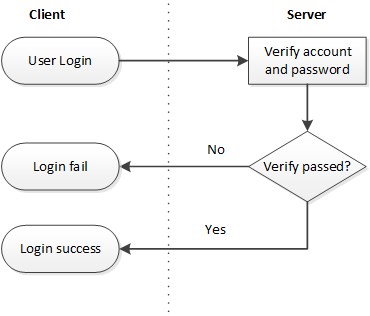
Figure 1: The Login Process without Accessing the Risk Control System
See Figure 2 for the login process that accesses the Risk Control System. Green boxes indicate new processes added to the server.
- Users can enter their account and password on the login page and then click Login.
- The servers will then verify if the account and password are correct. The log of logins will be sent to the Risk Control System in real time regardless of the results of login attempts.
- It returns to the login page if the combination is incorrect and displays prompts like “the account does not exist”, “incorrect password”, etc.
- If the combination is correct, the risk control interface will then be called to judge if there are any risks in this login.
- If there are any risks, the secondary verification process will be called.
- Otherwise, it enters the system.
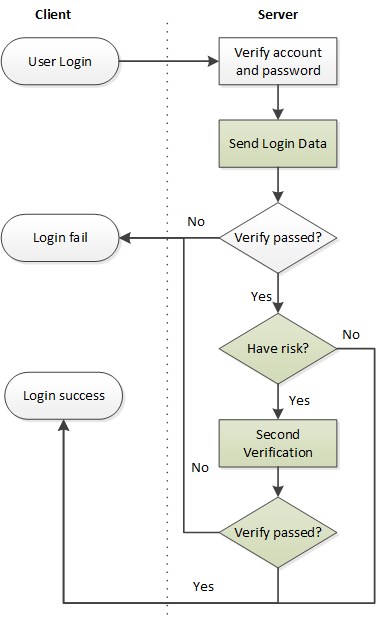
Figure 2: The Login Process That Accesses the Risk Control System
Access Detail
As shown in Figure 3:
- Users log in from the login page.
- After the account and password are verified by the server, the login will be called in real time to send the login log, regardless of the results of the login attempt.
- It returns an error if verification fails. However, computeRisk will be called to calculate the risk if it succeeds.
- A risk value will then be determined and if it is judged to be a risk (risk value >= 0.5) then it will enter into the second verification process.
- The detail steps of the secondary verification process is depend on which second authentication informaiton of the account is saved. For example:
- (1) Mobile Phone: A SMS with a random verify code should be send and verified by user.
- (2) Email Address: A email with a random verify code should be send and verified by user.
- (3) Password Question: The question and answer which was filled when registration should be verified by user.
- If the second verification is passed, the login will be successful. Otherwise, the login will fail.
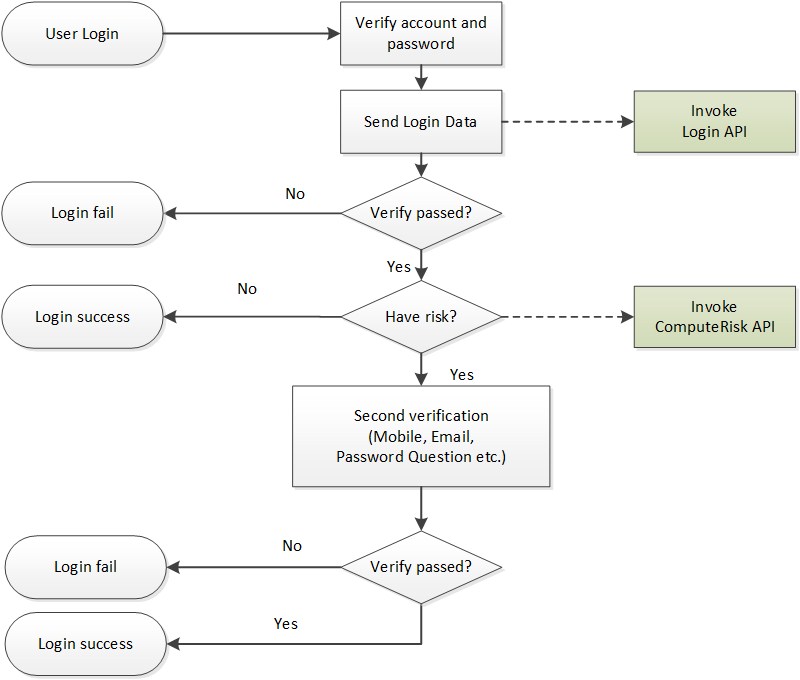
Figure 3. Flowchart for Accessing the Account security service System
How to Call the APIs
Please refer to the API Reference
